Remote support · for your own desk, or a hundred clients'

Nothing connects until you approve it.

One console for every machine you look after. A new device sits PENDING until someone approves it, one client's devices can't see another's, and the server checks both before it will pair anyone at all.

AGPL server, console and client · TOTP two-factor · append-only audit log · self-host or hosted

Console / Devices Sample data
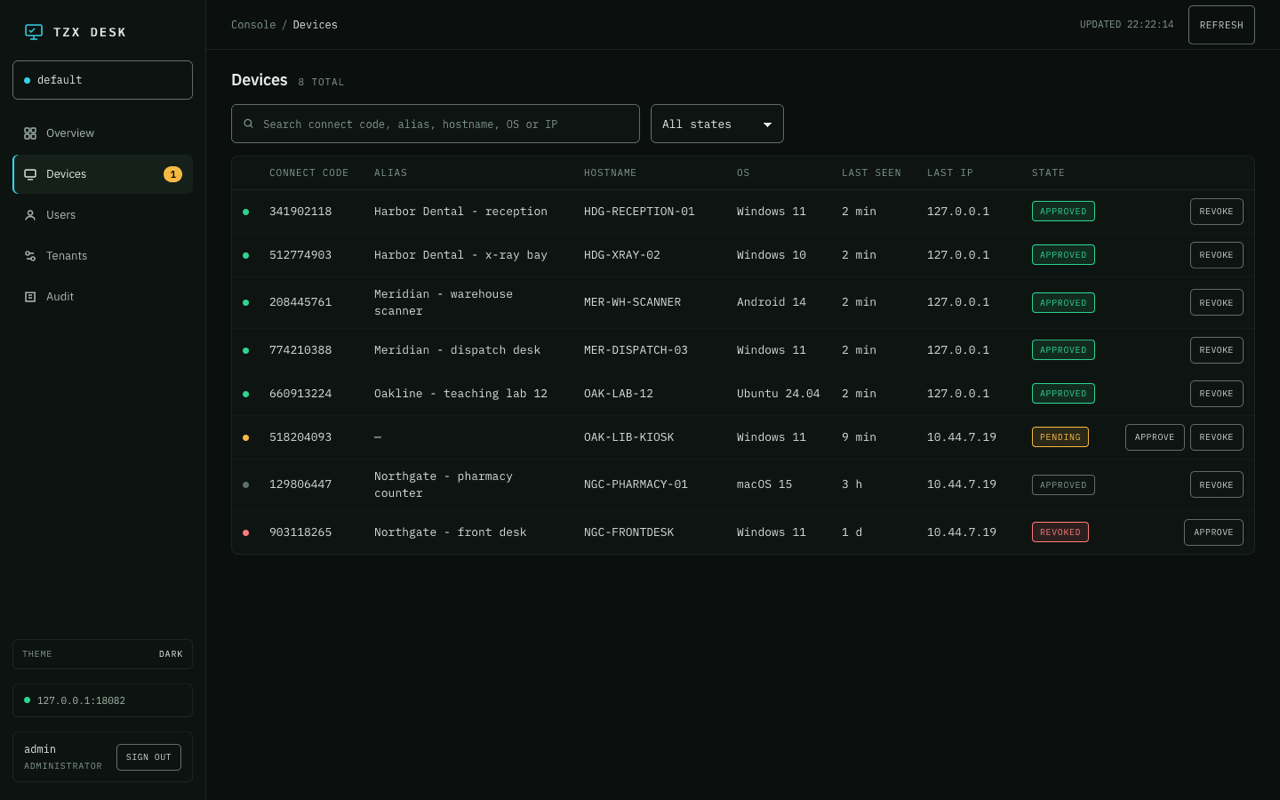
The TZX Desk console on the Devices screen, listing eight devices across four tenants with columns for connect code, alias, hostname, OS, last seen and state. One device is marked PENDING with an approve button, another is marked REVOKED.
Devices, with their state in the open. OAK-LIB-KIOSK is pending and NGC-FRONTDESK is revoked — no technician can reach either one until that changes.

How the approval gate works

A device is not trusted because it knows an address. It is trusted because someone said so, and because the server checked again at the moment of the connection.

How the approval gate works Three steps. One: a device enrols with a deploy token and is recorded as pending. Two: an administrator approves it in the console, moving it to approved. Three: before pairing any connection, the rendezvous server asks the console whether the target is approved and in the caller's tenant; no answer means the connection is denied. 01 · ENROL02 · APPROVE03 · ADMIT Device joinsYou approve itServer decides It arrives carrying a deploytoken and is filed as pending. An admin moves it to approvedin the console — or revokes it. Before pairing, the server asksthe console. No answer is a no. How the approval gate works, in three steps 01 · ENROL02 · APPROVE03 · ADMIT Device joinsYou approve itServer decides It arrives carrying a deploytoken and is filed as pending. An admin moves it to approvedin the console — or revokes it. Before pairing, the server asksthe console. No answer is a no.
  1. 01 · The device enrols

    You mint a deploy token in the console — tzxd_…, shown once, stored only as a hash — and hand it to the installer. The device comes up bound to one tenant and marked pending. Tokens can carry a use limit, an expiry, and auto-approve if you'd rather skip step two.

  2. 02 · A person approves it

    On the Devices screen an admin moves it from pending to approved, or revokes it later. A connect code already approved under another tenant is refused outright rather than quietly reassigned.

  3. 03 · The server admits the connection

    Before the rendezvous server introduces two machines, it asks the console over a private internal listener: is this target approved, is it inside the caller's tenant, and is the caller allowed to drive a session at all? Only then does pairing start.

The gate fails closed. If the console is slow, unreachable, or answers with anything unexpected, the connection is denied — not allowed through on the assumption that everything is fine. A revoked device is refused at the server, so revoking one does not depend on the device co-operating.

The same tool, two jobs

The mechanics don't change when you scale up. What changes is how many walls you need between the things you're looking after.

For you

Your own machines

The desktop at home, the laptop you left at the office, your parents' computer when they phone on a Sunday.

  • One account, a handful of devices
  • Address book, favourites and file transfer
  • Direct peer-to-peer when the network allows it
  • Or run the whole server yourself and tell nobody

Personal

For your clients

Every client behind its own wall

Each client is a tenant. Their devices, their technicians and their address book belong to that tenant and nothing else.

  • Tenant taken from the token, never from the client
  • Named technician accounts with TOTP two-factor
  • Sessions and file transfers in an append-only log
  • An installer with your server settings already in it

Team pricing

Self-host it, or let us run it

Same software either way. The only question is whose machine it sits on and who gets paged when it needs updating.

Self-host

Free

  • Three services — console, rendezvous, relay — from one compose file
  • Your server, your database, your logs
  • AGPL-3.0: the code you run is the code you can read
  • No licence key, no seat count, no licence server to call
Open source & licences

Hosted

Per technician

  • We run it, patch it and keep it up
  • Your tenants set up before you get the keys
  • Support from the people who wrote it
  • A dedicated region, on Enterprise
See pricing

Built for people who support other people's computers

Six things that matter when the machines aren't yours and someone will eventually ask you to prove what happened.

  • Tenant separation

    Every device, user and address book carries a tenant. The server resolves it from the bearer token and filters on it — never from anything the client sends up.

  • The approval gate

    Devices land pending. The rendezvous server asks the console before it pairs anyone, and a timeout counts as a refusal.

  • Deploy tokens

    Enrol devices without sitting at them. The token is shown once and kept only as a hash; set auto-approve, a use limit and an expiry per token.

  • Strategies

    Push client settings to a tenant's devices in the heartbeat, from an allow-list of known keys. They arrive as defaults — a strategy sets a machine up, it doesn't lock the person out of it.

  • Audit that reads back

    Console actions, connection sessions and file transfers in one newest-first feed you can pull over the API. Append-only: closing a session writes a new row rather than editing the old one.

  • Roles and two-factor

    Owner, admin, technician, viewer — with TOTP two-factor on console accounts. A viewer's token is turned away at the server: read-only means read-only.

Four ways in

One for your own machines, one for a lot of machines and only you, one for the clients you bill, and one for when a procurement form gets involved.

Personal

Free

Your own machines. One account, up to five devices, self-serve.

Solo

$7 / month

One person, unlimited machines. Deploy tokens, strategies and audit — and no support.

Team

$19 / technician

Several technicians, a wall between every client, branded installers, email support. $15 paid yearly.

Enterprise / self-hosted

Custom

A dedicated region or your own infrastructure, an SLA in writing, and onboarding.

See the full pricing

Tell us what you'd be using it for.

We're onboarding by hand at the moment, which means you get a real answer from someone who knows how it works.

Request access